Penmachine
23 March 2010
Another party movie
Reilly made a movie of the party we went to on the weekend:
You might recall another one of his videos I posted a couple of weeks ago.
Labels: birth, friends, geekery, movie, party, photography, vancouver, video
06 March 2010
Movie from still frames
Our friends Miranda and Reilly had going-away party last night for Tanya, who's moving to Calgary with her fiancé Barry. Reilly made a video:
Interestingly, he used a digital still camera. Not even the movie mode on a still camera, but the super-high-speed burst shooting mode of his top-of-the-line Canon EOS-1D Mark IV digital SLR, which can fire away at up to 10 frames per second. (Miranda and Reilly are the kind of people who are supposed to have expensive cameras. They're wedding photographers, and very good ones.)
The final video, compiled from over 5000 individual photographs, is arty, and a bit strange. My wife Air and I are in it, mostly in the background, but we're featured about four and a half minutes in, just as we were leaving. I'm Mr. Handshaking-Guy-in-a-Hat.
Labels: friends, geekery, movie, party, photography, vancouver, video
24 November 2009
Mama? Mama?
This video might just possibly be the best thing ever (via Alex):
It will be horribly overexposed any minute now, but I don't care, because it is so awesome.
Labels: humour, linkbait, muppets, video, youtube
18 November 2009
My interview last week on CBC TV
Last week, reporter Theresa Lalonde from CBC interviewed me at my house about how people can plan for what to do with their online presence after they die. The TV video report is now online, and soon I'll post the audio radio versions she did as well.
The topic is similar to a much longer interview I had with Nora Young at CBC's "Spark" last year. There are basically two components to the whole enterprise: figuring out which online activities of yours to shut down and how, and figuring out which ones to keep going and how.
Labels: cancer, cbc, death, radio, television, video
31 October 2009
Links of interest (2009-10-31):

- The rotor on the new Grouse Mountain wind turbine is turning very slowly, first time I've seen it move. Must be testing.
- Notice that when they have all those many layers on, supermodels almost look like normal people?
- Sydney, Australia covered the road of the Harbour Bridge with grass and cows, and 6000 people had a picnic.
- "No child has been poisoned by a stranger's goodies on Halloween, ever, as far as we can determine."
- Brent Simmons on vaccines (via Daring Fireball). I had chicken pox almost as bad, but at 15. My wife Air got shingles in '04. I'm flad the kids will get neither.
- If, like many Canadians, you have a huge voice crush on Nora Young, then this audio from CBC's Spark will slay you.
- Awesome song flowcharts for "Total Eclipse of the Heart" and "Hey Jude."
- Dan Savage is always so cheecky: "I don't believe that couples who make the choice to be monogamous should be discriminated against in any way."
- Archaeology doc "The Link" a few months ago was full of needless hype. Discovery Channel's "Discovering Ardi" shows how it's done properly.
- "I'm all for winging it, but saying 'I'm not really prepared' to an audience shows them the ultimate disrespect."
- Some interesting iPhone photography apps.
- Dark areas on this world map are the most remote from a city. No Antarctica, though.
- A new deal today with the Cowichan band means you'll be able to buy real sweaters at HBC Olympic store.
- Twelve images showing how vastly digital imaging has improved astrophotography on the ground and in space since 1974.
- Seven questions that keep physicists awake at night (still lots to learn, which is great).
- First-ever Lip Gloss and Laptops video podcast (for Halloween).
- American Samoa could have had a tsunami warning system, but funds were frozen in 2007 because of waste and corruption.
- Telus is selling iPhones in Canada Thursday of this week (Nov 5). Pricing is basically the same as Rogers/Fido (no surprise).
- The opposing Canadian "No TV Tax" vs. "Local TV Matters" ads are indistinguishable, obnoxious, and make both sides look like shitheads. Makes me want to go out and get some man-on-the-street interviews. "Excuse me, ma'am, did you know that both the TV networks and the cable companies are wasting money on advertising instead of trying to make better programming, using fake man-on-the-street interviews to try to confuse you about their own pissing contest? What do you think of that?"
- Here's a flu primer. The October 25 edition of CBC's "Cross Country Checkup" (MP3) is also good. Here's a slightly contrary position, and a more general one about the dangers of not vaccinating. Wired also has a cover story on the topic.
- Weird Al's relentless perfectionism in the studio (love when he gets a headache trying to channel Zack de le Rocha).
- As of today it's been 32 years since the last case of smallpox in the world was eliminated by vaccination.
- The 27" iMac has a shockingly low price for what you get - even for the LCD panel alone (via Dave Winer).
- Dave Winer also notes why death of a parent can make you grown up. My parents are alive, and doing great (better than me!).
- I like Barbara Ehrenreich's new book, though I haven't read it yet.
- Two people I know both had cancer surgery the same day, this past Monday.
- Top 10 Internet rules (via Raincoaster).
- $400 is expensive, but if you make serious video with a DSLR, I bet this LCD viewfinder is worth it (via Scott Bourne).
- Having to medivac a sailor from a US Navy submarine to a helicopter offshore is hairy and dangerous business!
- As Paul Thurrott said, people are going to be wandering into Microsoft's new store all the time and asking, "Excuse me, where are the iPods?"
- "If what you're doing does make sense, then, for Christ's sake, talk like a human being."
- From Psychology Today in 2008, ten ways we get the odds wrong on risk.
- You can now buy the whole Abbey Road album for Beatles Rock Band.
- Daughter M just described a fever-induced time dilation hallucination identical to mine from childhood. Never thought anyone would understand!
- Red Javelin Communications is apparently working with my company Navarik, but I'm finding their website rather too buzzwordy for my taste.
- Research in Motion. Oh, what will we do with you and your fine, fine, not-at-all-dirty URL http://rim.jobs?
- A great (much improved) update by Billy Wilson to my very popular "All the Current DLSRs" camera collage.
- Here's a sign of flu in our neighbourhood: our local Shoppers Drug Mart was entirely sold out of hand sanitizer. Both my kids were stricken, but I avoided it.
- Noya sings with my band sometimes. Here's her solo video.
- Another Ralph Lauren Photoshop disaster.
- The Diamond Dave Soundboard is still genius.
- As always, Saturn's rings and moons are some of the strangest and most beautiful things you can see.
Labels: australia, beatles, cbc, environment, evolution, holiday, lipglossandlaptops, microsoft, photography, podcast, sex, vancouver, video
26 October 2009
Odds videos
When I learned to play rock music back in the '80s, Vancouver's Odds (and their cover-band alter-ago The Dawn Patrol) were among my key inspirations. I got to know some of the guys in the band too. In the last five or six years, Odds bassist Doug Elliott has also become a good friend, as well as playing bass sometimes in my band.
After a hiatus of close to a decade, the Odds returned with a tweaked lineup of musicians and a new album, Cheerleader, last year, and now they've posted all their music videos dating back to 1991 on YouTube. They're worth a look and a listen. I think "Someone Who's Cool" is still my favourite:
Although the big suit shoulders and done-to-the-neck dress shirts of the early-'90s ones have a certain retro appeal too. Make sure you read the little descriptions by the band.
Some of the best Odds songs combine the intelligence of Elvis Costello with the booty-shaking overdriven guitar boogie of AC/DC, and that's a hard balance to accomplish.
Labels: band, friends, music, odds, video, youtube
20 October 2009
See my cancer
Here, take a look at this extremely cool and scientifically amazing picture:
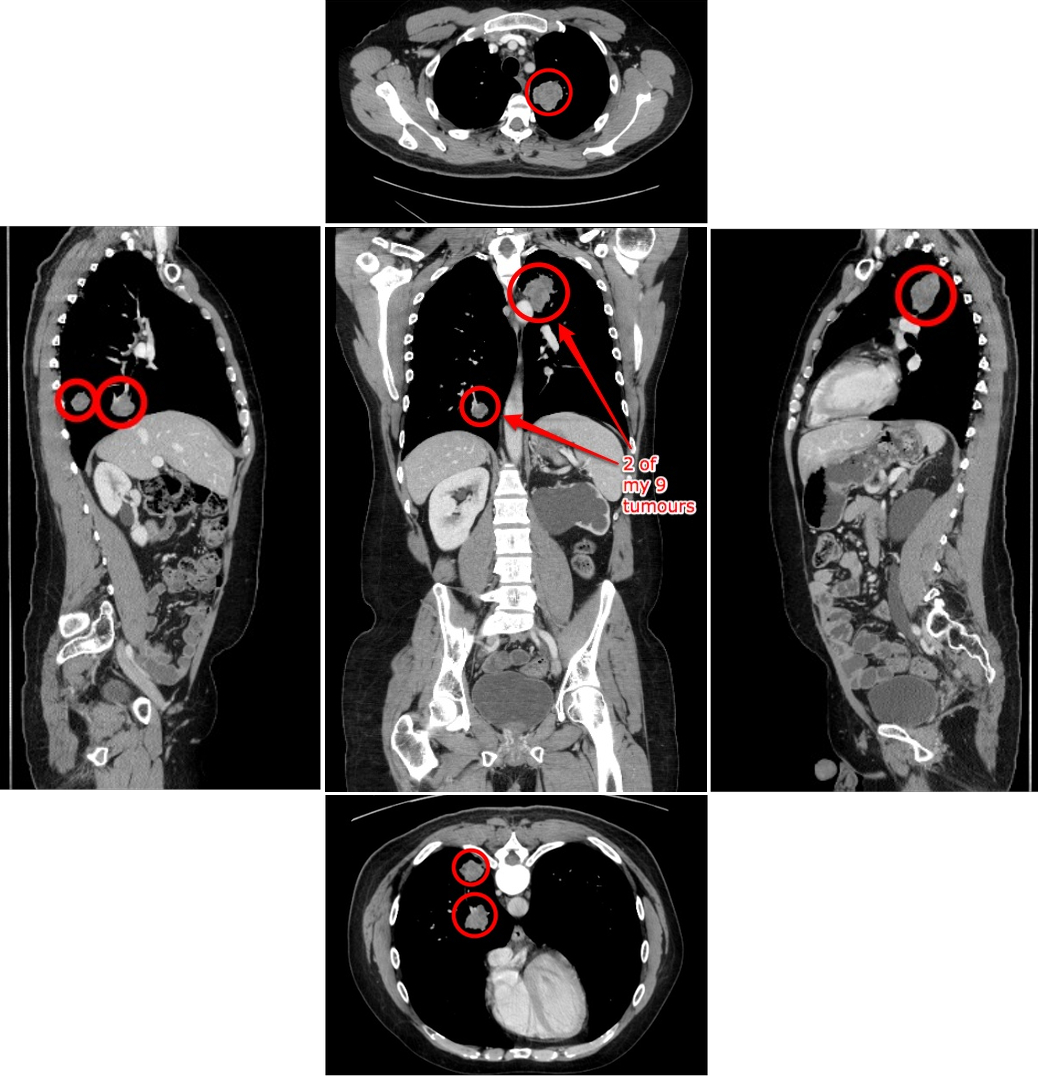
That's me, via a few slices from my latest CT scan, taken at the end of September 2009. I opened the files provided to me by the B.C. Cancer Agency's Diagnostic Imaging department using the open-source program OsiriX, giving me my first chance to take a first-hand look at my cancer in almost a year. Before that, the I'd only seen my original colon tumour on the flexible sigmoidoscopy camera almost three years ago.
I've circled the biggest lung tumours metastasized from my original colon cancer (which was removed by surgery in mid-2007). You can see the one in my upper left lung and two (one right behind the other) in my lower left lung. There are six more tumours, all smaller, not easily visible in this view. I'm not a radiologist, so I couldn't readily distinguish the smallest ones from regular lung matter and other tissue. Nevertheless, now we can all see what I'm dealing with.
These blobs of cancer have all grown slightly since I started treatment with cediranib in November 2008. To my untrained eye, the view doesn't look that different from the last time I saw my scan in December of that year, which is fairly good as far as I'm concerned. Not as good as if they'd stabilized or shrunk, but better than many other possibilities.
Labels: cancer, chemotherapy, ctscan, geekery, photography, science, software, video
19 October 2009
Links of interest (2009-10-19):
From my Twitter stream:
- My dad had cataract surgery, and now that eye has perfect vision—he no longer needs a corrective lens for it for distance (which, as an amateur astronomer, he likes a lot).
- Darren's Happy Jellyfish (bigger version) is my new desktop picture.
- Ten minutes of mesmerizing super-slo-mo footage of bullets slamming into various substances, with groovy bongo-laden soundtrack.
- SOLD! Sorry if you missed out.
I have a couple of 4th-generation iPod nanos for sale, if you're interested. - Great backgrounder on the 2009 H1N1 flu virus—if you're at all confused about it, give this a read.
- The new Nikon D3s professional digital SLR camera has a high-gain maximum light sensitivity of ISO—102,400. By contrast, when I started taking photos seriously in the 1980s, ISO—1000 film was considered high-speed. The D3s can get the same exposure with 100 times less light, while producing perfectly acceptable, if grainy, results.
- Nice summary of how content-industry paranoia about technology has been wrong for 100 years.
- The Obama Nobel Prize makes perfect sense now.
- I like these funky fabric camera straps (via Ken Rockwell).
- I briefly appear on CBC's "Spark" radio show again this week.
- Here's a gorilla being examined in the same type of CT scan machine I use every couple of months. More amazing, though, is the mummified baby woolly mammoth. Wow.
- As I discovered a few months ago, in Canada you can use iTunes gift cards to buy music, but not iPhone apps. Apple originally claimed that was comply with Canadian regulations, but it seems that's not so—it's just a weird and inexplicable Apple policy. (Gift cards work fine for app purchases in the U.S.A.)
- We've released the 75th episode of Inside Home Recording.
- These signs from The Simpsons are indeed clever, #1 in particular.
- Since I so rarely post cute animal videos, you'd better believe that this one is a doozy (via Douglas Coupland, who I wouldn't expect to post it either).
- If you're a link spammer, Danny Sullivan is quite right to say that you have no manners or morals, and you suck.
- "Lock the Taskbar" reminds me of Joe Cocker, translated.
- A nice long interview with Scott Buckwald, propmaster for Mad Men.

Labels: animals, apple, biology, cartoon, geekery, humour, insidehomerecording, iphone, ipod, itunes, linksofinterest, nikon, photography, politics, science, surgery, television, video, web
22 September 2009
The big cry
I've been digitizing some of our old home videos (using a DVD recorder and a Video8 camera borrowed from Paul to replace our long-broken one). Footage of my daughters as babies prompted me to hunt for a particular old scan—this one:

I think I took the two pictures in 2002, when my daughter was about two and a half. She's nine years old now. And I doubt she'd let me get away with taking a similar photo today.
Labels: family, memories, photography, video
11 September 2009
Lonely cactus
Time lapse video between 8:00 a.m. and 2:00 p.m. I had hoped one of the flowers would open, but no such luck. Music is from my track "Striking Silver."
Labels: biology, home, photography, video
10 September 2009
A few short movies by me
I made three short videos a little while ago, but forgot to link them up here. Silly me. Here they are:
All three were taken with my Nikon D90 SLR, which has a video mode.
Labels: animals, conferences, gnomedex, meetup, nikon, seattle, transportation, video, whistler
17 August 2009
My video course now at London Drugs
Remember my GarageBand training video? The one you can buy from MacVideoTraining (with a 20% discount using the checkout promo code ihr)? This one?
It's now available online from London Drugs too, as well as on DVD in their stores here in Western Canada. Why not buy some copies for your friends (and enemies, for that matter)?
Labels: apple, education, insidehomerecording, itunes, paulgaray, recording, software, video
03 August 2009
When we are one
While researchers continue to study it, no one is yet sure why music moves us—how we can be affected emotionally by timed sequences of sounds. But we are. And while I play rock drums and love me some guitar, in my life, the most affecting music has been live, vocal, and collective.
Here's what I mean. One of the most astonishing things I've ever heard was the student choir at Magee, the high school where my wife teaches. Years ago I attended one of their concerts. They are, and have long been, an excellent choir. You can get a tiny sense of it from this video, but the sound doesn't do it justice (plus, Christmas carols in August sound weird):
That's a pale simulation of the true experience, though. At that concert years ago, held in the school's old auditorium, the singing was enveloping, and overpowering, from a full-size choir onstage. I almost cried from the sound alone.
Here's another example that had me getting teary for no good reason:
Thanks to Darren for the link.
Those of us who were around in the '80s best remember Bobby McFerrin from his annoying novelty song "Don't Worry, Be Happy." But he is a powerful and innovative jazz singer, who is at his best when co-opting audiences. When he does that, when the audience sings along as a mass of voices, I lose it. I nearly cried right now as I listened to the audience come in on "Ave Maria" at the link I just posted—and again at the end:
So beautiful. There's no way I could have held it in if I had been there.
I can think of other instances: Celso Machado and the crowd I was in at the Vancouver East Cultural Centre more than 15 years ago, or a packed-full B.C. Place Stadium singing the end of U2's "40" ("How long/To sing this song...") long after the band had left the stage in 1987. You get the idea.
Whatever the reasons we evolved to love music, one of its benefits is how it joins us. When you sing with a group, or even if you're just there when one is singing well, you become part of that group in a way that's almost impossible by any other means. You could be singing "Ave Maria" with McFerrin, or chanting "Die! Die! Die!" with Metallica, but when it happens, you're all one. We're all one.
Labels: biology, evolution, music, video
21 July 2009
My daughters made a Star Trek movie
Speaking of space stuff, you might enjoy this video my kids made (with a little of my editing help) this week:
Drama! Excitement! Evil croissants!
Labels: family, humour, sciencefiction, startrek, starwars, video, youtube
14 July 2009
Links of interest 2006-07-05 to 2006-07-13
Yup, still on a blog break. So, more of my selected Twitter posts, newest first:
- Vancouver to Whistler in one minute (okay, I cheated):
- We're in the mountains, but in a civilized way. Pool/hot tub, grocery store across the street, Wi-Fi. But, uh, there is mountain weather.
- Super-duper stop-motion movie with 60,000 photo prints (ad for Olympus, via Lisa Bettany and Photojojo). Chris Atherton points out that this follows Wolf and Pig.
- Okay camera nerds, here's some rangefinder pr0n for you.
- The stereotypically blingtastic (and boobtastic) video diminishes Karl Wolf's tolerable version of Toto's "Africa." (And I'm no Toto fan.) It's like a live-action Hot Chicks with Douchebags. Yes, the choirboy harmonies are actually kind of charming, but he's going P-Diddy on it in the end.
- In the storage closet, my kids found something of mine from 1976 that is EVEN GEEKIER than my U.S.S. Enterprise belt buckle:
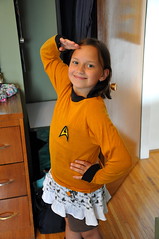
Red shirts were available back then, as well as the blue Mr. Spock style, but I chose Kirk. Of course. - The only sounds I can hear right now: the dishwasher, the fan in the hallway, and the birds in the trees outside the window.
- During my biology degree, Platyhelminthes was a favourite organism name. Now there's a plush toy! (With 2 heads!!)
- When I used to busk with the band, our biggest victories were scaring away the holy rollers across the street (we got applause).
- Neat. When a ship is built, here are the differences between milestones: keel laying, christening, commissioning, etc.
- AutoTune the News #6. Even more awesome.
- Picked up kids from Aldergrove camp. Sadly, there was a terrible accident on the Port Mann Bridge. We took a long Langley/Surrey/New Westminster detour.
- Google's changing culture. Point: Google now has more employees than Microsoft did at launch of Windows 95.
- Time lapse: 8 hours from my front window in about 1 min 30 sec, made with my new Nikon D90 and free Sofortbild capture software (and iMovie):
Something like John Biehler's Nikon Coolpix P6000 is better for timelapse long term; the D90's mechanical shutter, which is rated for 100,000 uses, would wear out in less than 6 months if used for time lapse every day. P.S. Andy Gagliano pointed to a useful Macworld podcast about making time-lapse movies. - Depressing: most Internet Explorer 6 users use it at work, because they're not allowed to use another browser.
- These Christopher Walken impressions are way funnier than I expected.
- The way monkeys peel a banana shows us we've all been doing it the needlessly hard way all these years.
- Um... hot!
- Most appropriate Flash cartoon ever?
- Drinking whisky and Diet Dr. Pepper, watching MythBusters. Pretty mellow.
- A good photo is "not about the details or the subject. It's what your subconscious pulls out of it all without thinking."
- Just picked up another month's supply of horrible, nasty, vile, wonderful, beautiful, lifesaving anti-cancer pills. Thanks, Big Pharma Man.
- My wife tells me she's discovered a sure-fire tip for a gal to attract quality guys in public: carry a huge SLR camera over your shoulder.
- "For the great majority [...] blogging is a social activity, not an aspiration to mass-media stardom."
- Just talked to younger daughter (9) for first time after three days at summer camp. She's a little homesick, but having fun.
- I took a flight over a remote landscape:
- The 50 worst cars of all time (e.g. "The Yugo had the distinct feeling of something assembled at gunpoint").
- I haven't seen either Transformers movie, but that's okay, I saw this.
- Dan Savage: cheating on your spouse should now be known as "hiking the Appalachian Trail." Good point in the article too.
- You can still buy a station wagon with fake wood paneling!
- Train vs. tornado. It does not end well. Watch without fast-forward/scrubbing for maximum tension.
- Just lucked into a parking spot on Granville Island. Time for some lunch.
- Sent the kids off for a week of horse-riding camp today. Wife Air and I had sparkling wine in the garden. Vewwy vewwy quiet around here.
- Just sorted a bunch of CDs. Still several discs missing cases, and cases missing discs. I feel like a total '90s throwback.
- Rules of photography (via Alastair Bird).
- When did the standard Booth Babe uniform become cropped T-shirt and too-short schoolgirl kilt?
- Listening to "Kind of Blue." It's been awhile.
- "A two-year old is kind of like having a blender, but you don't have a top for it." - Jerry Seinfeld (via Ryan).
Labels: audio, biology, blog, cancer, chemotherapy, family, flickr, geekery, google, microsoft, movie, music, oceans, photography, sex, startrek, transportation, video, whistler
27 May 2009
Learn GarageBand from me on DVD
My Quick Start to GarageBand video course from MacVideoTraining (a company co-founded by my former podcasting partner Paul Garay) is now available on DVD:
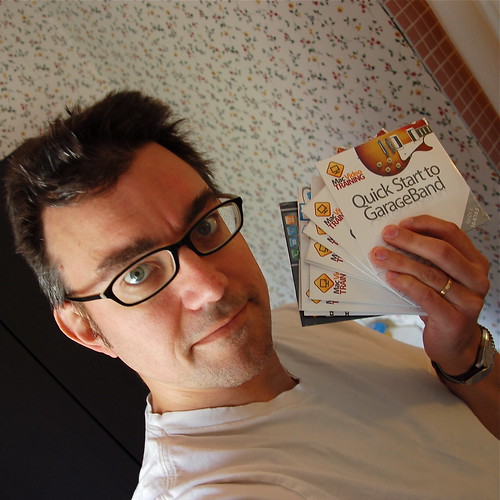
You can get it at London Drugs and many other retailers in North America, or if you use the promo code ihr, you can get a 20% discount if you buy a DVD or download online. The discount code also works for John Biehler's iTunes course and other stuff from MacVideoTraining, including bundles.
Labels: apple, education, insidehomerecording, itunes, paulgaray, recording, software, video
05 May 2009
Flutebox and Beardyman
[Cross-posted from Inside Home Recording (IHR).]
We've highlighted some fine beatboxers at IHR over the years, but these two (Flutebox and Beardyman, from the U.K.) are the best I've ever seen:
There's so little technology here (two mics, two voices, and a flute), such a performance could theoretically have happened 50 years ago, but no one would have thought of it. Eighteen minutes may seem awfully long for a web video, but I promise you'll be mesmerized. It's worth watching all the way through.
Labels: band, insidehomerecording, music, video, youtube
23 April 2009
Videos that are scary-dumb
Example the First: I stumbled into this fine satire of a climate change denial video the other day. It's hilarious, with its ironic attempts at hipness, images of the world exploding, and with-it clip art youth proclaiming "Shut up!", "What the hell?", and "No way!"
Except, um, it's not a satire. It's an actual, serious video from our pals here at Vancouver's right-wing think-tank the Fraser Institute. I think it may very well be the "Gathering Storm" of anti–global warming videos—so ridiculous it's laughable.
Example the Second: Via Phil Plait, I found this astonishing record of Texas congressman Joe Barton, yesterday asking the U.S. Secretary of Energy Steven Chu (also the winner of a Nobel Prize in Physics, by the way) where all the oil in Alaska came from. Chu is obviously puzzled at why Barton would ask something so basic, but as the congressman continues his question, Dr. Chu realizes that Mr. Barton apparently doesn't have the first clue about geology or plate tectonics:
Wow. Even more depressing, Mr. Barton thought he'd stumped Dr. Chu, and said so on his Twitter account! The rest of the Twitterverse (me included) quickly corrected the congressman. Since Dr. Chu only had six seconds to respond, and was obviously so aghast at Mr. Barton's lack of knowledge, he couldn't formulate a proper response. Given a minute, he could have said:
Hundreds of millions of years ago, when Alaska was in a different place on the globe because of continental drift, trillions of microorganisms lived and died there. Immense heat and pressure converted their bodies, buried deep underground by geological processes, into simpler hydrocarbons, like oil. That’s why they’re called fossil fuels.
Not an Example: As a relief from those, here's something amazing (via Tim Bray and kk+):
That's more like it.
Labels: bicycle, environment, extremesports, science, video
24 March 2009
I made a goofy little metal video
Paul Thurrott and Leo Laporte have used my tune "More Red Than Red" as theme music for their Windows Weekly podcast since 2006. But on their latest episode, they thought about maybe replacing it with the title track from the album "Enigma," by Microsoft's retired chief of Windows development (and longtime guitarist) Jim Allchin. So I tried to dissuade them at the Penmachine Podcast:
The "Turrican Van Halen" reference is part of the Windows Weekly show—it refers to the old Commodore 64/Atari/Amiga game "Turrican."
I made this available as Inside Home Recording TV Episode #5. You can also download it (H.264 video) or watch it at Viddler, Blip.tv, Facebook, YouTube, and Vimeo. Licensed for you to share and reuse, as long as you give me credit.
Labels: insidehomerecording, leolaporte, music, penmachinepodcast, podcast, video, windows
12 March 2009
That rocks
In case you doubt that a mashup can be true art, see here:
Via Big Al.
Labels: mashup, music, video, youtube
04 February 2009
iLife '09 is worth the upgrade
 If you have a Mac, Apple's $100 Cdn iLife suite of programs is perhaps the best deal in software today. That may be true even if you don't have a Mac, because if you buy one, iLife comes along free—and just a few years ago, the features of any one of its programs would have cost you more than the computer does today. So depending on what you do, it's almost like you're getting the Mac for free instead.
When it first appeared in 2004, for instance, GarageBand inspired me to start recording music again after a long hiatus. iPhoto is an extremely capable photo cataloguing program, and even as a pretty keen photography enthusiast, it's what I use to manage my collection. For me, iMovie, iWeb, and iDVD come along as bonuses.
iDVD is capable enough on the rare occasions I need to make a video DVD. The new versions of iMovie are still pretty weird, in my book, but they work, and I may warm to the new iMovie '09 now that it's improved over the confusing reboot that was iMovie '08. iWeb—well, as a web guy, it's never been my cup of tea, and I gave up on it a few months ago after giving it a good two-year chance to justify its existence. But some people might like it.
iLife '09 is the latest iteration of the package, and I picked it up last week, shortly after it became available in stores. I'll be reviewing the new GarageBand for Inside Home Recording sometime soon, but there are already some other impressions on the web. Jim Dalrymple at Macworld looks at the new guitar-focused changes in GarageBand, Rick LePage examines iPhoto's new emphasis on face recognition and location awareness, and screenwriter John August takes a crack at iMovie '09.
I have to agree with Fraser Speirs that iPhoto's new integration with Facebook and Flickr looks way too heavy-handed. I actually don't want photos, tags, names, and such synchronized between my computer and those sharing sites. Usually, I just want to push photos out from iPhoto, and maybe make changes on the Web, but I don't want those changes propagating back and forth. I often prefer to collect very different sets in the two places, and may need to name people on my computer but not online, for instance. So I don't think I'll be turning those features on, but will use my old methods instead.
In iLife '09, GarageBand makes big changes, especially in new features (like Lessons) that i didn't even know I'd want, while still keeping what makes it great. iPhoto adds extremely cool new stuff that I'll definitely use, and some other stuff I definitely won't. iMovie may have redeemed itself enough that I'll work with it again. iDVD? We'll, it's still there. And iWeb? Despite good progress, it's just not the way I work with websites (I create almost everything in a text editor).
I'm happy with what I've seen from iLife '09 so far. For $100, as always, it's a total steal.
Labels: apple, music, photography, review, software, video
23 January 2009
Two Vancouver fog photos, almost completely identical
Was the now-famous Vancouver fog photo taken by Scott Miller from the Vancouver Sun, or Blair Kent? As I show in this short video, the answer could be... both:
The two images were made at almost the same time, in almost exactly the same location off the Cypress Bowl road above Vancouver. But they are two different photos—the clouds have moved, and the tree in the corner shows a very slightly different perspective.
So, to Scott and Blair both: great pictures. I can't say which is better.
Labels: americas, photography, sunshine, vancouver, video, weather
14 January 2009
Parlour tricks
Knowing that I can raise my lip, Stallone-style, my older daughter asked me to make this silly 20-second video:
No strings were harmed during filming. The song is my own "P and P," from 2005.
Labels: family, flickr, humour, video
21 December 2008
Free MP3 song: "Vitamin Yummy"
When I put together the GarageBand video course that Mac Video Training is now selling, I of course had to construct a song using the program. I had no plan in advance, so as I worked my way through the various videos the tune sort of assembled itself into a weird little song I ended up calling "Vitamin Yummy" (3 MB MP3 file):
- Download "Vitamin Yummy" (2 min 30 sec)
It's silly, and I'm not even sure what style to call it, but there you go. As usual, it's available under a Creative Commons license so you can share it around. I'm also not sure if this song qualifies for the Miss604 iTunes Giveaway either, but I'll enter it anyway.
Labels: apple, free, guitar, insidehomerecording, music, penmachinepodcast, software, video
Science is amazing
Okay, so here's a movie (via Bad Astronomer) of Jupiter's moon Ganymede passing behind the giant planet. Pretty darn amazing and cool:
Now here's the really amazing part. The movie was assembled from a series of images taken not from a probe sent to Jupiter from Earth. Nope, they were taken by the Hubble Space Telescope, in low orbit around our own planet. These pictures were taken, over the course of two hours in April 2007, from here, something like 600 million kilometres away from the subjects. The light from Ganymede and Jupiter took almost an hour to reach the Hubble camera.
Talk about your telephoto lens.
Labels: astronomy, movie, photography, science, space, video
18 December 2008
Last IHR of 2008, GarageBand training, mention at TidBITS
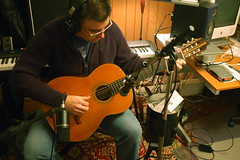 Those of you who listened to my classical guitar recording of "What Child Is This?" yesterday might be interested in how I recorded it. I describe that in episode #65 of Inside Home Recording (IHR), our last one for the year. My bit starts about 36 minutes in, but there's lots of interesting stuff in the rest of the show too.
On a similar instructional note, over the course of several weeks this fall, when I was feeling well enough, I recorded almost 60 short instructional videos about how to use Apple's GarageBand audio software. They now form the Quick Start to GarageBand '08 course from Mac Video Training, a company co-founded this year by my former IHR co-host Paul Garay and Mike Kaye from Switching to Mac. The complete course costs $30 USD (about $40 Cdn these days) for download, and will be available on DVD in stores in the new year. (Earlier DVDs by different instructors are already at shops like London Drugs.)
Here's the introductory video:
Finally, the fine folks at TidBITS, a Mac-focused online newsletter that's been publishing since before the Web was invented (really!), have highlighted my Camera Works series here on some technical aspects of cameras and photography. I've written for TidBITS in the past, and it's a great resource you should all subscribe to. I can't even remember how long I've been reading it, but every issue teaches me something.
Labels: apple, guitar, insidehomerecording, paulgaray, photography, software, tidbits, video
29 August 2008
Video montage of Gnomedex
Chris Pirillo, who organized the Gnomedex conference last week, posted a fun video compiling a bunch of photos from the event. As far as I can tell, most of the photos are from my Flickr set, which is cool:
He calls it "The Beginning of Human Circuitry." The groovy technobleep soundtrack is "Icarus" from Trash80.net, and the video was assembled using Animoto.
Labels: animation, conferences, gnomedex, kriskrug, photography, pirillo, video
29 July 2008
The purple E! The purple E!
I'm not sure I'm entirely comfortable supporting the TMZ paparazzi (a woman near the end of the video calls them "vultures"), but it's refreshing to see a celebrity like John Mayer have just as much trouble doing family phone tech support as the rest of us:
Via Dan "No Longer Fake Steve" Lyons.
Labels: apple, music, techsupport, video, youtube
22 June 2008
The best brainless, fun, hard-rockin' songs, according to Derek
 There's a certain type of rock-n-roll song that bypasses your intellect and goes straight for the gut—or a bit lower. One that makes you want to shake your ass, or your head, and sing along, even if you don't know the words, because the words don't matter all that much. They're dumb and sophomoric, anyway, or at least unintelligible—probably about sex or cars or girls or something.
Such a song features guitars, bass, drums, and singing, but probably no keyboards and definitely no strings, horns, or children's choirs. It probably has about three chords, or sounds like it does. The guitars are distorted and loud, and there's almost certainly a guitar solo too, but a short one. You want to turn it up. You know what I'm talking about.
Here is my top 10 list of such songs. Yeah, they're all very mainstream, and you may disagree with me, but I don't care—go ahead and leave a comment if you have further suggestions. I'll include some of my own runners up in a later post. It's a stupid list of stupid songs, which is the reason they're great to begin with:
The Breeders, on the other hand, say, "Koo koo," or, more thoroughly, "Hey now, hey now/Want you, koo koo/Cannonball." Their song is built on a monster bass riff, vocals laid down as if sung through telephones and bullhorns, squeals of feedback, and thick, chunky guitar chords. Plus a drum fill that launches into the chorus like a machine gun, not a cannonball.
Joey Ramone is hiccuping like an amphetamine-fueled Buddy Holly about kids piling in the back seat and losing their minds, Johnny is buzz-sawing his barre chords, and Dee Dee and Tommy pummel away in the background. Despite the disappointing charts and record sales, I'm sorry, "Blitzkrieg Bop" is way better than Steely Dan or the Doobie Brothers.
Yet he was also taking a dig at the very kids who joined in singing, "Our little group has always been/And always will until the end." Yeah sure, teenagers always think so: oh well, whatever, nevermind. The guitar solo exactly duplicates the verse melody too, so it's sort of an anti-solo. Yet you don't need to know any of that, and I'm not sure Nirvana really wanted to you think about it very much, since the song rocks out no matter what.
That's the same reason Van Halen (see below) released a version as their first single in 1978. And while the Beatles may have sung "oh yeah!" a little earlier, no one has ever snarled it with more conviction than Ray Davies. Sure, the Rolling Stones might have seemed a tad dangerous back in '64, but I'm sure whenever kids put "You Really Got Me" on the turntable, it's what really scared the parents.
It wasn't as big a hit as "You Shook Me All Night Long," but that doesn't matter either—because there's more power and good-time boogie in the first chord of "Back in Black" than most bands put out in their entire careers. The clincher is the sing-along chorus: "Ba-a-a-a-ack! Ba-a-a-a-ack! Back in black, yes I'm back! In! Black!" Put away your schoolboy short pants. You're done.
Eddie's lithe little guitar solo is neck-snappingly brief, but still manages to tell a whole story. It starts off with a stereotypical string-bending riff any guitarist could play, then skyrockets off into impossibly fast finger-tapping, whammy-bar–wrangling madness before settling down into the gritty, slinky background of the spoken-word bridge, in which Roth intones the immortal words, "We're runnin' a little bit hot tonite/I can barely see the road from the heat comin' off it/Ah, you reach down/Between my legs/Ease the seat back..." In the background we hear the revving engine of Eddie Van Halen's Lamborghini, which was apparently backed into the recording studio (!) for the purpose.
Then we're into a building, building, building setup that climaxes with spot-on a capella harmonies from the whole band singing, "Ain't no stoppin' now!" What is the sing-along chorus? One word, over and over: "Panama! Panama-uh!" Who can forget the video too, which is like a compendium of pop petal clichés, including Dave riding through the streets of Los Angeles on his motorbike, mane of hair flowing in the wind?
And we're still done in under four minutes. I bow before you, Van Halen. If there is a more perfect song for a hot drunk summer night, I can't think of it.
After much discussion in the comments to this post, I must also add an honourable mention for Sweet's "The Ballroom Blitz" (I can't figure out which other tune to replace with it), from 1973. Brian Connolly's singing is so off-the-hook frenzied, so Rocky Horror Picture Show over the top that it's almost yodeling, and as Bob noted in the comments here, it's hard to beat an intro like, "Are you ready Steve? Andy? Mick? All right fellas, let's GOOOOOOOOOOOOOO!"
Labels: band, linkbait, lists, music, radio, video
14 June 2008
Getting good sound on your audio podcast
I co-host Inside Home Recording, a long-running audio podcast about recording music and other stuff in your home or project studio. Earlier this year we launched InsideHomeRecording.tv, a companion video podcast that offers short tutorials on the same subject. I just put together my first episode, which shows the process I use for my wife's podcast, Lip Gloss and Laptops, to get good sound reasonably efficiently and cheaply:
You can download IHR TV #3 (H.264 video) or watch it at Blip.tv, Vimeo, and Viddler. A shorter version is also on Revver, YouTube, MySpace, and Facebook. You can receive IHR and IHR TV updates at twitter.com/ihr. And you can subscribe to either the original IHR audio show or to IHR TV.
Let me tell you, though, video is hard. I constructed this episode using a combination of Final Cut Express (to import high-definition video from our AVCHD camcorder) and iMovie '06—which is an old version of that program—for editing. There was lots of importing and exporting, syncing and chopping up and reassembling, and general mucking around with stuff to get it to something I liked.
The reason I undertook such a convoluted process is that Final Cut Express is a big, hairy, complicated program. It does more than I need, and is nearly impossible to sit down and figure out by using it, while the "re-imagined" new iMovie '08 is too simple, designed with a minimalist set of features for absolute video beginners, which even I am not. But iMovie '06 is the perfect mix for me. Even so, it took hours and hours to put the episode together.
My next one will come together faster, because I've figured out some stuff, but I have a new respect for people who make videos, TV shows, and movies for a living—especially editors.
Labels: audio, editing, insidehomerecording, lipglossandlaptops, podcast, video
09 April 2008
Flickr does video
The Neurotics Fab Rock Invasion
Originally uploaded by penmachine
The new video sharing features of the formerly photo-only site Flickr are different: the designers obviously thought a lot about how to implement video without just cloning how YouTube and everyone else does it.
The key thing is that videos uploaded to Flickr must be less than a minute and a half long, and no bigger than 150 MB. That's a limitation, but also a gift. It forces you to think about what to upload, and if you have a longer video, to edit it down to its essence.
My first video upload there is a good example. I had to take a video of my band that was already only a few minutes long and make it even shorter. I had to cut out non-licensed music and any other extraneous bits. In the end it's only one minute, but it still gets the point of our act across, even without any singing at all.
I think the time limit will generate some creativity in the Flickr community, as well as avoiding those interminable videos that take forever to get to the point. Even if a video is bad, you'll only have to waste 90 seconds on it. We'll see what happens within the well-imagined constraints.
Labels: band, design, flickr, geekery, music, neurotics, video
01 April 2008
Camcorders have changed in 10 years
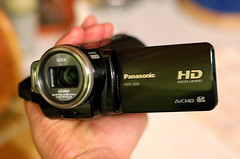 Over at Inside Home Recording, we recently started IHR TV, additional short video tutorials that augment our regular longer audio podcasts. As part of that effort, we used some of the money we get from sponsors and advertisers to buy two Panasonic HDC-SD5 high-definition camcorders. (Bought online, two of them cost only very slightly more than a single one at local retail stores.)
The last camcorder my family had, which sits half-broken in our basement, was an old Samsung analogue Video 8 tape-based machine, from 1998. Given the improvements in other consumer electronics, from personal computers to digital cameras to televisions, over the past decade, I'm not sure why I'm so surprised at this little camcorder, but it's a remarkable machine.
Consider, first, that it can record at 1920x1080i "Full HD" resolution, with something like six times the detail of our old camera, using a very nice mechanically stabilized Leica lens. It stores that information not on tapes, but on the same SD cards used by the still cameras and audio recorders we have at the house. The whole camera is only about a third larger, and almost exactly the same weight, as the old Samsung battery—being smaller than my hand, it almost gets lost among its accessories in our camcorder bag.
Perhaps most remarkably, Panasonic has put real thought into simplifying how the camera works. There aren't many buttons and dials, they're clearly labeled, and everything is easy enough to figure out that the manual (which is long and detailed, but only averagely written) is only necessary for some of the more detailed settings. The SD5 even takes pretty nice still photos.
Those huge HD videos, however, require a lot of horsepower to edit: only one of the computers in our house (my Intel MacBook) will even import the massive AVCHD video files directly. And, following the trend in pocket still cameras, there is no longer a viewfinder: you have to look at the pop-out LCD screen to frame your shots. Like too many consumer electronics today, the camera also comes festooned with garish and difficult-to-remove little stickers advertising its features, the software it comes with, and so on. I removed those immediately.
It lacks a couple of pro features that would be useful: the only sound-in is from the stereo microphone, so you can't connect an external mic or line-in sound, which is something I'll work around with a separate audio recorder if needed. (Very cleverly, though, the microphones can focus in on your subject as you zoom the lens, and electronically filter out some wind noise. Nifty.) Similarly, while it comes with cables to send sound and video out to a TV or other device, you can't record video from any source other than the lens, so I can't, for instance, use it to digitize any of our old footage.
With devices like these, it's no wonder people can now smuggle broadcast-quality video out of the world's war zones and trouble spots. We'll see what I can do with this camera and my mediocre video skills for our modest little podcast.
Labels: geekery, leica, panasonic, photography, podcast, video
16 March 2008
Learn home recording at IHR TV
 My Inside Home Recording podcast co-host Paul has been making instructional videos for macProVideo.com for some time now, and he's good at it. So when he proposed that we start putting out short video podcasts in addition to our regular audio show, I knew they could be useful.
Now we've posted our first episode of Inside Home Recording TV (IHR TV). This one Paul recorded entirely himself. It's about using Propellerhead's ReWire to link their Reason software to Apple's Logic Pro.
We're trying something new with this video podcast. As usual, you can subscribe to watch on your computer, Apple TV, iPod, Zune, or whatever. In addition to posting it on our own site, you can also find each episode free at the video sharing sites Revver, Vimeo, Blip.tv, and YouTube. Plus we post them to Facebook, and will note each new show (audio and video) at Twitter.
Labels: apple, insidehomerecording, paulgaray, podcast, video
05 March 2008
VFS students made a video of my tsunami blog posts
 Back in late 2004 and early 2005, following the Indian Ocean earthquake and tsunami, I wrote a series of blog posts that turned into a popular online article about tsunamis.
Now a two-minute video based on it, created by three local film school students, is available in iPod-compatible format for iTunes or QuickTime—as well as on my podcast.
Click the preview below to play it, or the direct link to see it bigger (that big one is a 25 MB MPEG file, so it may take awhile to load):
My friend Sebastien, who is Head of Digital Design at Vancouver Film School, referred me to the three students (Jamie Peterson, Erica Edwards, and Shalinder Matharu), who needed a topic for an infographic project. My contribution was limited to a couple of basic scripts; they did the rest, adapting the article into the instructional video graphic using Adobe Illustrator, Photoshop, and After Effects (no, those are not real paper cutouts—I asked).
Obviously, they had to cut down the concepts a huge amount to fit into the short time available, but I think the result is effective. It's difficult to keep scientific accuracy in such an abbreviated format, but I believe any quibbles a real wave researcher might have (such as with the shape of the wave) are pretty minor. Nice job, Jamie, Erica, and Shal.
Labels: animation, blog, podcast, school, science, video